

What you unlock
Issue actions in chat
Create a Linear issue, link an existing one, or add a comment — directly from any chat message, without switching
tabs.
Channel notifications
Subscribe any channel to a Linear team or project and receive instant notifications when issues are created,
updated, or commented on.
31 agent tools
Give your AI agent full read/write access to Linear — issues, projects, milestones, teams, documents, comments, and
more.
Automated triggers
Start an agent task automatically when something changes in Linear — new issue, status change, comment, priority
update, or assignment.
Connect Linear
1
Open Settings → Integrations
In any workspace go to Settings → Integrations and select Linear.
2
Get your API key
Open linear.app/settings/api, create a personal API key, and copy it — it starts with
lin_api_.3
Paste and connect
Paste the key into the API Key field and click Connect.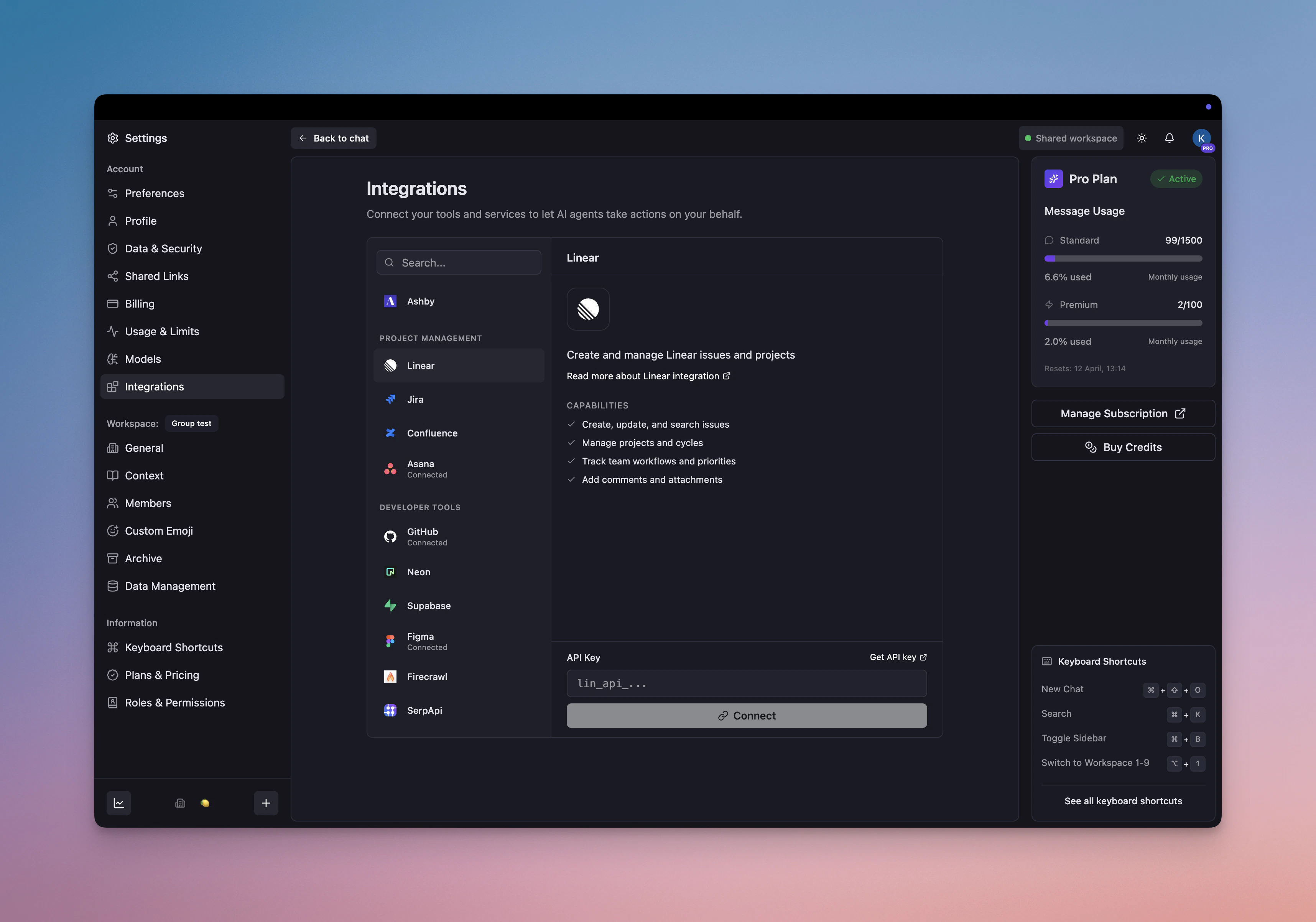
One API key unlocks agent tools, issue actions in chat, and channel notifications — all three. Triggers require an
additional one-time event authorization, described below.
Issue actions in chat
Once connected, every chat message gets a More actions menu (···) with three Linear shortcuts.Create an issue from a message
Turn any message into a Linear issue in seconds — no copy-pasting required.- Hover over the message and click More actions (···) → Create Linear issue…
- A panel slides in with the title and description pre-filled from the message.
- Set the team, status, priority, assignee, project, and labels.
- Click Create Issue — the issue is created and you get a confirmation with the link.
Link an existing issue
Attach a reference to an existing Linear issue so the conversation stays connected to the work.- Click More actions → Link Linear issue…
- Search by title or identifier (e.g.
NUL-123). - Select the issue and click Link Issue.
Add a comment to an issue
Post the message content directly as a comment on any Linear issue.- Click More actions → Add comment to issue…
- Search for and select the target issue.
- Click Add Comment — the message is posted as a comment in Linear.
Channel notifications
Subscribe a channel to a Linear team or project to receive system messages when issues change.1
Open the channel menu
Right-click any channel in the sidebar and select Integrations.
2
Set up a subscription
Choose a Linear team (and optionally a specific project), then pick which events to follow.
3
Start receiving updates
Linear delivers a system message to the channel in real time whenever a matching event occurs.
Agent tools
You can enable the available Linear tools on agents that need them. Keep write and delete actions off agents that only need to read issues.Issues
Comments
Projects & Milestones
Documents
Attachments
Teams, Users & More
Triggers
Triggers start an agent task automatically when something changes in Linear. They require a one-time event authorization separate from the API key.1
Create a task with a Linear trigger
Open any agent, go to the Tasks tab, and add a new task. In the trigger picker, choose Integration → Linear.
2
Choose which events to watch
Pick one or more of the five available events.
3
Authorize events
The first time you save a Linear trigger task, Mantle asks you to approve the event connection in Linear.
Example use cases
Turn a message into an issue in one click
Turn a message into an issue in one click
Someone reports a bug in chat. Instead of switching to Linear and re-typing everything, click More actions → Create Linear issue — the title and description are already filled in from the message. Add the team and priority, click Create.
Keep a channel updated on your team's Linear work
Keep a channel updated on your team's Linear work
Subscribe your #engineering channel to a Linear team. Every new issue, status change, and comment shows up as a system message — the whole team stays in sync without anyone having to watch Linear directly.
Auto-triage new issues with an agent
Auto-triage new issues with an agent
Trigger: Issue createdWhen a new issue is created, an agent reads the title and description, labels it, sets priority, assigns it to the right person, and posts a triage summary to the team channel.
Get notified when work moves to review
Get notified when work moves to review
Trigger: Status changedWhen an issue moves to “In Review”, the agent posts a message in the relevant channel with a summary and a direct link — no manual status updates needed.
Troubleshooting
My API key isn't working
My API key isn't working
Make sure the key starts with
lin_api_ and was created at
linear.app/settings/api. Personal keys give access to all teams your account
belongs to. If it still fails, delete the key in Linear, generate a fresh one, and paste it again.I can't see the channel notification panel
I can't see the channel notification panel
The notification panel needs a valid Linear API key to fetch your teams and projects. Connect one under Settings →
Integrations → Linear first.
Trigger tasks aren't firing
Trigger tasks aren't firing
- Confirm the task is active (green indicator on the Tasks tab). 2. Check that the trigger is set to Linear with the right events selected. 3. Re-authorize the event connection if Mantle shows that it expired.
The agent can see issues but can't create them
The agent can see issues but can't create them
Personal API keys have write access by default. If creation fails, check that your Linear account has permission to
create issues in the target team.
Back to Integrations
View all available integrations